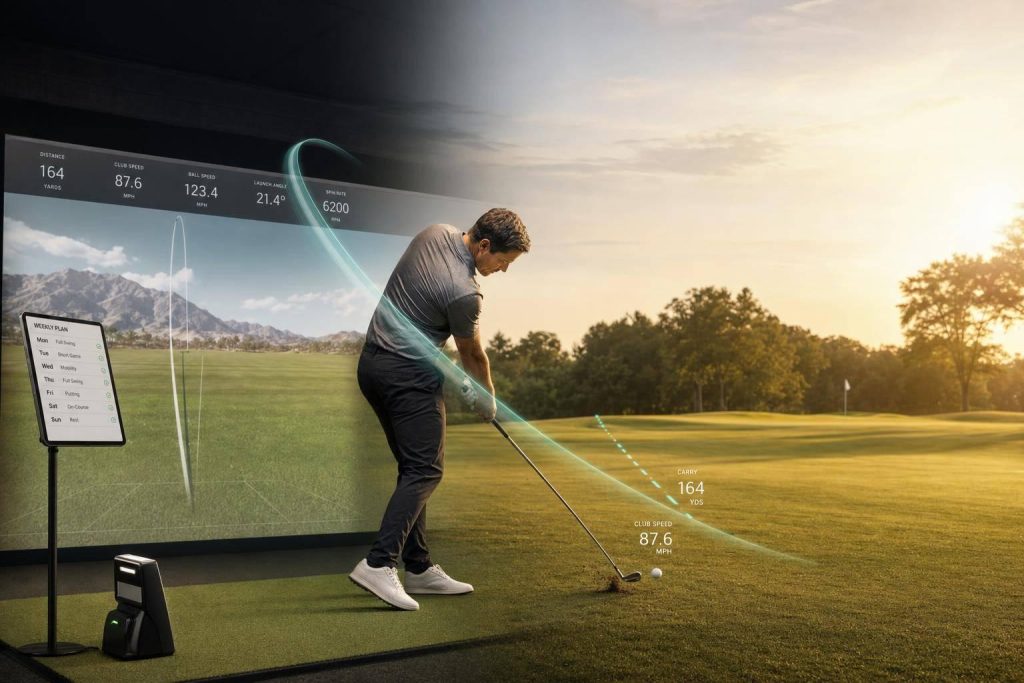
Virtual golf training helps most when the tool matches the player. Beginners often get the best results from simple VR putting and basic simulator reps, while advanced players usually get more from swing data, wrist tracking, and coach feedback. Across the studies in this article, transfer to play on the course was strongest when practice was close to the shot being trained, feedback was clear, and sessions followed a plan.
Here’s the short version:
- Beginners and high handicaps saw the clearest gains, especially in putting drills and attention training.
- Intermediate players did better with practice that mixed virtual work and on-course or practice-green reps.
- Advanced players got less from generic VR and more from precision feedback like club path, face angle, spin, and tempo data.
- Putting improved in some studies, but carryover was less steady than full-swing work.
- A common beginner setup was 20 to 30 minutes, 3 to 4 times per week, for about 6 weeks.
- One novice putting study found no statistical difference between VR practice and physical practice for later on-course putting performance.
- Another found a drop in radial error with p = 0.001, which points to strong early improvement for new players.
If I strip it down even more, the path is simple: learn basics in VR, build consistency with mixed practice, then use data tools for small fixes.
| Skill level | Best use of virtual training | What to watch for |
|---|---|---|
| Beginner | Short-putt drills, basic swing reps, gaze and focus training | Keep drills simple and repeatable |
| Intermediate | Mixed reality, variable practice, simulated rounds | Make sure practice still matches course play |
| Advanced | Launch monitors, biofeedback, remote coaching | Use it for diagnosis, not as a full stand-in for play |
I’d treat virtual golf as a practice tool, not a full swap for time on the course. Used the right way, it can shorten the learning curve for new players and help skilled players clean up small errors.
The BEST Way To Improve Your Golf Swing on a Simulator
sbb-itb-bcd8bdd
What Studies Show for Beginners and High-Handicap Golfers
The clearest results show up with beginners and high-handicap golfers. That makes sense. Newer players are still building the basics, and VR gives them a calm, repeatable place to work on those patterns without the usual pressure of a live round.
For beginners, the big question isn’t only whether VR helps. It’s whether that progress shows up on the course. This section looks at Stage 1 of the article’s beginner-to-advanced path.
VR putting and early transfer to actual play
The early data on putting is encouraging. In one study with 40 novice golfers, players who practiced putting in VR and players who practiced in the physical world both improved their real-world putting accuracy after training, with no statistically significant difference between the groups.
Another VR putting intervention found a significant increase in putts holed across training sessions (p < 0.05). It also found a significant drop in real-life radial error compared with a control group (p = 0.001).
That points to a simple idea: beginners improve when the drill looks and feels close to the job they’re trying to do. If VR putting matches actual putting closely, transfer tends to be better.
Why beginners may benefit more than experienced players
VR practice seems to help most when players are still learning core skills like face angle awareness, start-line control, and basic speed judgment. Repetition matters here. So does instant feedback .
There’s another piece, too. Beginners don’t only need stroke work. They also need to learn where to focus their attention.
In a study using Eye Movement Modeling Examples (EMME) in VR with 42 novice golfers, the group that watched an expert’s gaze cursor during putting showed the largest increases in quiet-eye duration. That same group also posted significant gains in holed putts, radial error, and both putt line and length.
A separate quiet-eye training study with 46 novice undergraduates found the same general pattern. Perceptual-cognitive training improved real-world putting from baseline to post-test and retention, whether practice happened in VR or on a real green. Put plainly, this kind of training can make attention habits easier to pick up.
Where structured learning resources fit for beginners
Practice reps help, but beginners usually need some structure so those reps don’t turn into random motion. A simple guide can connect short VR sessions to a clear routine.
How To Break 80 offers beginner-friendly resources that link isolated virtual practice to an organized training plan.
For more advanced players, those same tools tend to lead to smaller gains and a different set of tradeoffs.
What Research Shows for Intermediate and Advanced Golfers
For advanced golfers, virtual training tends to work best when it tracks specific swing mechanics, not just broad body movement. Once the basics are in place, the biggest gains usually come from diagnostic tools. At this point, the goal isn’t simple repetition anymore. It’s targeted correction.
Where advanced players still gain from technology
Biofeedback sensors turn feel into measurable wrist data during the swing. That matters for both full swings and putting. For example, tracking lead wrist flexion at impact can cut down on flipping and help improve contact. That’s where at-home practice starts to pay off: you get instant feedback that shows what the wrists are actually doing, not just what they seem to be doing.
For putting, wrist rotation and tempo tracking can help keep the putter face square through impact. Research also points to about a 2:1 backstroke-to-downstroke ratio as the target for steady distance control. Remote coaching tends to work best when the sensor data focuses on one movement flaw at a time. This data-driven approach is a core component of modern golf lessons for elite players.
How advanced learning content fits the pathway
At this stage, practice should center on measurable goals like wrist control, shot shape, distance control, and putting precision. Structured resources help turn those numbers into drills you can repeat with purpose. That shift matters in the pathway below, where training moves from general feedback to stage-specific drills.

A Research-Based Pathway From Beginner to Advanced
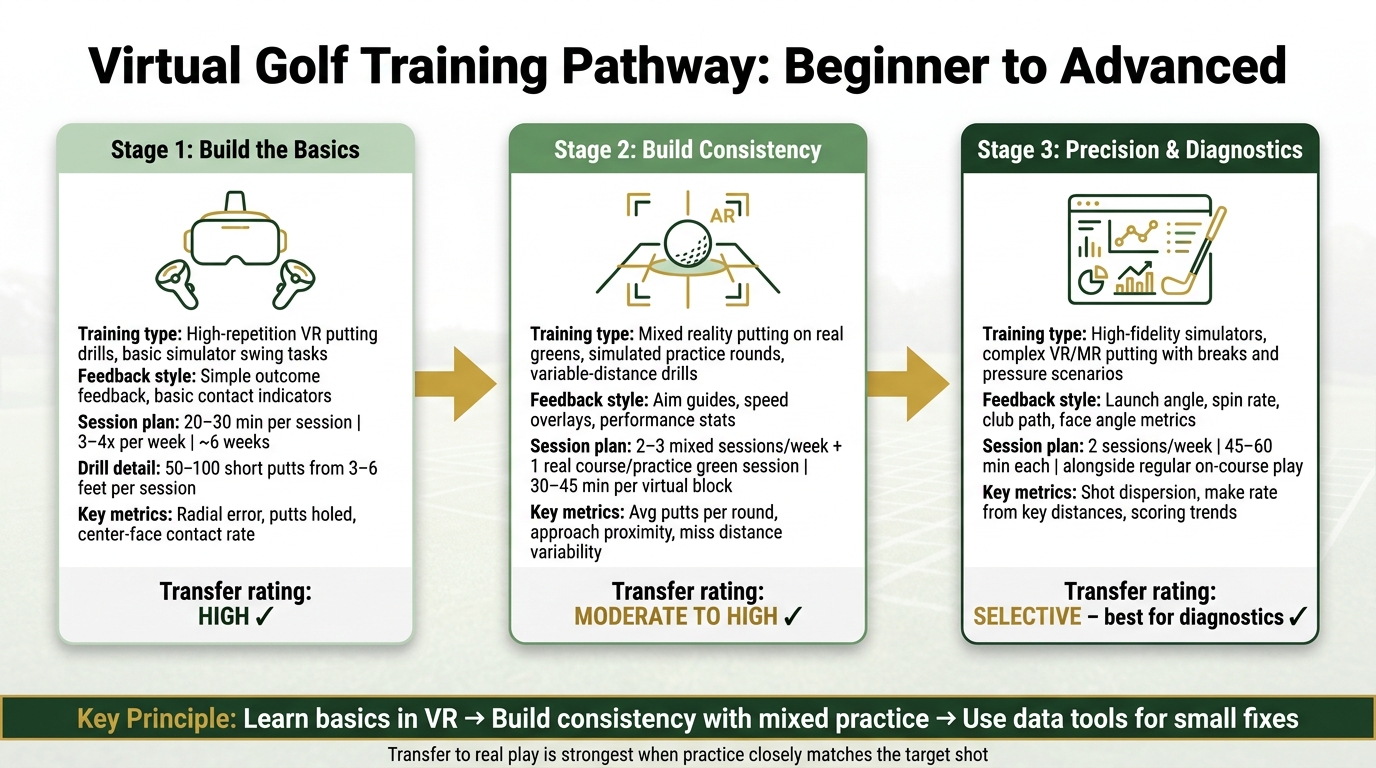
Virtual Golf Training Pathway: Beginner to Advanced Stages
Put the studies side by side, and a clear pattern shows up: beginners do best with repetition, intermediate players need transfer-focused practice, and advanced golfers get more from precision work. That gives you a practical three-stage pathway based on skill level.
Stage 1 to Stage 3 progression
Stage 1 is all about the basics. Beginners and high-handicap golfers tend to get the most from high-repetition VR putting drills and simple simulator swing tasks with driving tips for beginners and clear feedback on contact, club path, and face angle. A solid Stage 1 plan is 20 to 30 minutes per session, 3 to 4 times per week, for about 6 weeks, with 50 to 100 short putts from 3 to 6 feet in each session. Resources like How To Break 80 can help newer players connect virtual reps with core ideas like grip, stance, and stroke path.
Stage 2 moves from basics to consistency. Intermediate golfers can add mixed reality putting on real greens with augmented aim and speed cues, along with simulated practice rounds that match on-course choices. A workable setup is two to three mixed sessions per week, plus one session on a real course or practice green, with each virtual block lasting 30 to 45 minutes. At this point, the goal is steadier play when moving between virtual and real putting surfaces.
Stage 3 is where precision and decision-making take center stage. Advanced golfers can use high-fidelity simulators to study launch angle, spin, club path, and face angle, then use that data to build specific shot patterns. VR and MR putting at this level may include tougher breaks and pressure putts, with the focus on high-fidelity practice. A common schedule is two 45- to 60-minute simulator sessions per week, alongside regular on-course play.
The tables below turn that pathway into a quick reference.
Training focus by skill level: comparison table
| Skill Level | Task Type | Feedback Style | Common Outcome Measures | Expected Transfer to Real Play |
|---|---|---|---|---|
| Beginner | Short-putt VR drills; basic simulator swing tasks | Simple outcome feedback and basic contact indicators | Radial error, putts holed, center-face contact rate | High for putting accuracy and swing consistency; novice studies show strong real-world transfer. |
| Intermediate | MR putting on real surfaces; simulated practice rounds; variable-distance drills | Aim guides, speed overlays, and performance stats | Average putts per round, approach proximity, variability in miss distance | Moderate to high when tasks are representative; MR can improve immediate performance and reduce task load. |
| Advanced | High-fidelity simulator sessions; complex VR/MR putting with breaks and pressure scenarios | Detailed launch, spin, path, and face-angle metrics | Shot dispersion, make rate from key distances, scoring trends | Selective; best for diagnostics and refinement, especially when followed by real-world calibration. |
VR, mixed reality, simulators, and remote coaching: comparison table
| Modality | Realism | Feedback Depth | Best Fit | Transfer Evidence |
|---|---|---|---|---|
| VR (fully virtual) | Moderate; can create perceptual mismatch for experts | Basic to moderate | Beginners building fundamental patterns | Strong for novices; mixed for skilled golfers. |
| Mixed Reality (MR) | High; real surface with augmented overlays helps reduce sensory mismatch | Moderate | Intermediates bridging virtual and real-course performance | Moderate; often more comfortable and usable than fully virtual putting. |
| Simulators / Launch Monitors | High for ball-flight data; physical feel varies by setup | Deep | Intermediate to advanced players refining shot shaping and directional control | Moderate to strong; virtual and real performance show a significant correlation in simulation research. |
| Remote coaching | Low environmental realism; high feedback quality | Deep | Committed intermediates and advanced amateurs | Moderate; effectiveness depends on data quality and coach-athlete communication. |
Limits of the Evidence and Key Takeaways
Research gaps that affect conclusions
The pathway above is useful, but the research behind it is uneven. Some findings look promising, yet the evidence is still held back by small studies and transfer tests that don’t always line up. That matters even more as training moves from simple drills into actual on-course play. A simulator score can look good and still miss the stuff that changes a round in the real world: uneven lies, wind, and weather.
Virtual putting is the weakest link. That makes the transfer evidence for putting less convincing, which is why putting is still the least reliable stage of virtual training.
The table below shows how study design affects how much weight each result should carry.
Study design versus reported outcomes: comparison table
| Study Type | Participant Level | Intervention Length | Outcome Measures | Transfer to Real Golf |
|---|---|---|---|---|
| Single-player simulator case study (n=1) | Advanced amateur | Multi-year | Scoring average, total strokes over par | Positive; simulator and real scores were nearly identical over 15 rounds. |
| Simulator full-swing work | Varies | Variable | Launch monitor data, swing mechanics | Best for swing diagnostics; high-end systems are generally rated around 9/10 for accuracy, though occasional misreads can affect confidence. |
| Putting settings | Varies | Variable | Green reading and short-putt practice | Weaker transfer; putting is the least realistic part of many home simulators. |
Taken together, the studies point to targeted use, not sweeping claims.
Conclusion: What the research supports most clearly
Virtual golf training is most dependable for full-swing and approach work. Putting remains the least transferable area. The clearest support is for focused practice, not as a full replacement for the game itself. Virtual training works best when the practice goal matches the real task as closely as possible.
FAQs
How do I know which virtual golf tools fit my skill level?
Start by getting clear on your main goal. Maybe you want more clubhead speed, better contact, or help with a slice. From there, think about your setup at home and what you want to spend. If you’re just getting started, structured, self-paced resources like How To Break 80 can help you build solid basics without adding complicated gear.
It also helps to match the tool to your skill level. Beginners usually need simple feedback they can act on right away. Intermediate players can make use of more swing data without getting lost in it. Advanced players tend to get the most from precise metrics that help fine-tune small parts of the swing.
The big idea is simple: pick tools that give clear, useful feedback. Raw data might look impressive, but if it doesn’t tell you what to change, it’s just noise.
Can virtual golf practice really lower my scores on the course?
Yes. Virtual golf practice can help lower your scores because it turns random range time into focused, data-driven practice. Instead of just beating balls, you can work on clear problems, clean up swing flaws, dial in your tempo, and build mechanics you can repeat under pressure.
Research suggests that golfers who stick with a structured practice plan for at least four weeks are more likely to see their scores come down. How To Break 80 builds on that with practical drills, eBooks, and video courses designed to help turn practice gains into on-course progress.
What should I do if my simulator results don’t match my real play?
Start by checking your setup. Lighting, device placement, and even the weather can affect accuracy.
Make sure the simulator follows the manufacturer’s guidelines. Use a tripod to keep the video steady, and check that sensors are attached securely.
If needed, pair the simulator with real-play equipment or specialized balls to get better distance and spin data.
Most of all, focus on long-term trends, not one-off results that jump around.
Related Blog Posts
- Best Course Strategy Simulators for Golfers
- Top 7 Golf Simulator Drills for Game Scenarios
- Best Virtual Tools for Swing Practice Routines
- Ultimate Guide to Golf Practice at Home
