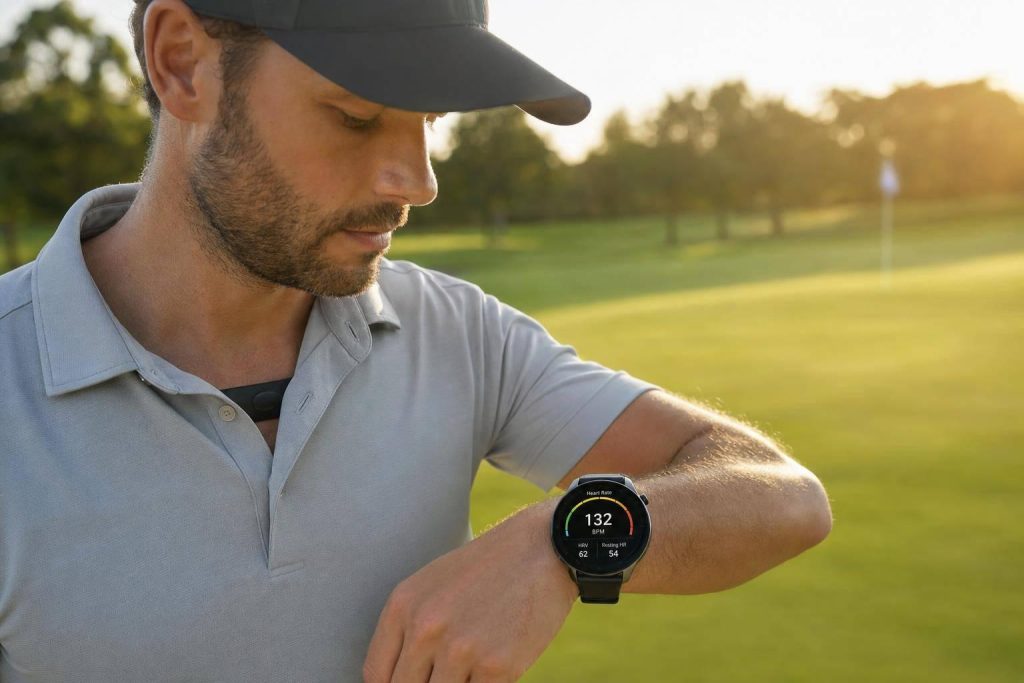
Golf can wear you down more than you think. If I track my heart rate, I can spot fatigue, set better training zones, and use sleep, HRV, and resting heart rate to decide when to push and when to back off.
Here’s the short version:
- Golf is still exercise, especially over 18 holes, in heat, on hills, or when I carry my bag.
- Heart rate zones tell me how hard I’m working during a round or workout.
- HRV and resting heart rate help me check recovery before I practice or play.
- Wrist-based watches are easy to use, but swing motion can cause bad readings.
- Chest straps are usually more accurate for training.
- Default max heart rate settings can be off by 10 to 30 beats per minute, so I should not trust app defaults.
- A better starting point for max heart rate is 207 − (0.7 × age).
- For fitness, I should do 30–60 minutes in Zone 2 and add 1–2 short Zone 3–4 sessions per week.
- If my resting heart rate is 5–10 bpm above normal, or my HRV has been low for a few days, I should keep practice light.
- On the course, I should focus on heart rate trends and zones, not calorie numbers.
If I want a simple plan, this is it: use a watch for on-course ease, a chest strap for training, and recovery data to avoid tired practice sessions that hurt my swing and decision-making.
| Device | Best For | Main Tradeoff | Price |
|---|---|---|---|
| Golf watch | GPS, yardage, scorekeeping, heart rate | Less accurate than a chest strap during motion | $200–$600 |
| Chest strap | Training accuracy | Less comfortable, no golf features | $60–$120 |
| Recovery wearable | Sleep, HRV, readiness | Limited golf use during play | $150–$400 |
Bottom line: if I use heart rate data the right way, I can pace myself better, train with more purpose, and shoot like the pros by holding my focus later in the round.
Why The Best Athletes Play A Mental Game
sbb-itb-bcd8bdd
Common Problems Golfers Face With Heart Rate Data
Heart rate data only helps if you trust it. Before you use it to shape training, you need to know when the numbers are solid and when they’re a little shaky. Most golfers run into the same few problems, and the good news is that each one has a fix.
Why Wrist Readings and Calorie Estimates Can Mislead You
Wrist optical sensors are easy to wear, but they’re not perfect. During a golf swing, motion, sweat, and weak skin contact can cause spikes and dropouts in your readings.
That’s why a single odd number usually doesn’t matter much. The bigger picture matters more. Did your heart rate stay up longer than usual? Did it run higher than you expected across the round? Those patterns tell you a lot more than one weird reading on the watch.
Setup Mistakes That Lead to Bad Data
The most common problem is simple: fit.
If your watch slides around during the golf swing, it can lose contact with your skin and throw off the reading. It should feel snug, not so tight that it cuts off circulation, but tight enough to stay in place through the motion.
Chest straps can also go wrong if you rush setup. You need to moisten the sensor pads before putting the strap on. And the strap should sit right against your skin, not over an undershirt.
There’s another mistake that trips people up: leaving the device on default settings. The standard “220 minus age” formula can miss your true max heart rate by 10 to 30 beats per minute. As exercise scientist Greg McMillan puts it:
"The most commonly used formula – 220-minus-your-age – can be off by 10 to 30 beats per minute for any given individual. That’s not a small error. Thirty beats is the difference between Zone 2 and Zone 5."
A better place to start is the Tanaka formula: 207 − (0.7 × your age). It’s still not exact, but research shows it lines up better with adult populations than the old method.
Once your readings make sense, you can start using zones to get something useful from the data.
What Heart Rate Zones and HRV Actually Mean
Heart rate zones and HRV are not the same thing, even though people often lump them together. That mix-up can lead to bad reads on your data.
Heart rate zones show how hard you’re working right now. They’re based on a percentage of your maximum heart rate, so they help you judge training intensity during a session.
HRV, or heart rate variability, looks at the tiny changes in time between heartbeats. A higher HRV usually points to a more recovered nervous system. A lower HRV can mean your body is still dealing with stress from training, poor sleep, or day-to-day life.
| Metric | What It Measures | When to Use It |
|---|---|---|
| Heart Rate Zones | Intensity during activity | Identifying physical fatigue during a long round |
| HRV | Recovery and nervous system stress | Determining if you are physically ready for a practice session |
| Resting Heart Rate | Baseline cardiovascular fitness | Tracking long-term cardiovascular improvements from walking the course |
If you’re just getting started, begin with zones. Then add HRV when you want a better sense of recovery. For most golfers, zones are the clearest first step.
How to Use Heart Rate Zones to Build Golf Fitness
Now that you know what the zones mean, put them to work in golf-specific training. The goal is pretty simple: build your base first, then layer in a little harder work. That gives you stamina without leaving you cooked before your next round.
Use Zone 2 Work to Stay Fresh Through 18 Holes
Zone 2 sits at 60–70% of your max heart rate. It should feel easy enough that you can speak in full sentences. This is the zone that builds the aerobic base that helps you stay steady through all 18 holes.
Aim for 30–60 minutes of brisk walking, easy cycling, or similar low-intensity work. Think of it as the kind of engine-building work that helps you keep your pace, focus, and decision-making steady when the round starts to drag late in the day.

Add Short Zone 3 to 4 Sessions for Hills, Heat, and Carrying Your Bag
Once that base is in place, add a small amount of higher-intensity work for tougher rounds. Short hard efforts can help you deal with hills, heat, and carrying your bag without fading late.
Zone 3 builds endurance. Zone 4 helps you handle short, hard efforts. A good place to start is 1–2 short interval sessions per week, such as hill repeats. In Zone 4, talking should be difficult and limited to short phrases.
Set Your Zones With Personal Numbers, Not Default Settings
Your zones should come from your numbers, not default app settings. The common 220-minus-age formula can miss your true max heart rate by as much as 36 beats per minute. That’s a big gap, and it can throw off the whole plan.
Use your max heart rate and resting heart rate to calculate your zones. Measure your resting heart rate over several mornings, then apply the Heart Rate Reserve (HRR) method, also called the Karvonen formula.
If you want a tighter anchor, use a 30-minute hard effort and take the average heart rate from the final 20 minutes as your lactate threshold heart rate. It’s a solid way to set zones without doing an all-out test.
How Recovery and Stress Data Can Protect Your Score
Heart rate zones show how hard you worked. Recovery data shows whether your body is ready to do it again.
What a High Heart Rate Before or During a Round Can Tell You
Once you’ve set your training zones, heart rate can also help you catch days when you’re not recovered enough to play well. A higher-than-normal heart rate can point to poor sleep, dehydration, heat, caffeine, or stress.
On the course, that higher baseline can affect more than just how you feel. If your heart rate is high during an easy walking pace, your tempo can speed up and your decisions can slip, especially late in the round when fatigue starts to pile up.
If you notice your heart rate climbing more than usual on a hill or during a tense hole, take it as a signal to slow your breathing and drink some water. That’s why pre-round and mid-round heart rate patterns can work as recovery checks, not just fitness data.
Use HRV, Resting Heart Rate, and Sleep to Plan Practice Days
Your overnight data – HRV, resting heart rate (RHR), and sleep quality – gives you a better read on what your body can handle that day.
The big thing is to watch the trend, not one isolated score. When your recovery numbers look solid, that’s a good day for a harder range session or walking 18. When they’re off, keep things light – maybe a short putting session or an easy Zone 1 walk. As Kylie Morgan, Clinical Exercise Physiologist, says:
"Heart rate varies with sleep, stress, caffeine, heat, and more. Use zones as a guide alongside how you feel."
One rough night doesn’t mean you need to change everything. Track trends and weekly averages instead of reacting to one score. If your HRV has been dropping for several days in a row, that’s the point where it makes sense to pull back.
Recovery Metrics Golfers Should Watch: Comparison Table
Use these metrics as quick go/no-go signals for practice and rounds.
| Metric | What It Measures | What a Useful Trend Looks Like | Golf Impact | Smart Adjustment |
|---|---|---|---|---|
| HRV | How recovered or stressed you are | Stable or higher only when training load rises | Better focus and emotional control under pressure | If low, keep the day short and easy |
| Resting Heart Rate (RHR) | Your resting heart rate | A consistent or gradually decreasing trend over several weeks | Lower RHR means better stamina for walking 18 holes | If 5–10 bpm above normal, prioritize hydration and keep effort in Zone 1 |
| Sleep Duration | Time spent in restorative sleep stages | Consistent 7–9 hours with minimal disruptions | Poor sleep leads to rushed tempo, weak decision-making, and higher on-course HR | If short, reduce practice volume and avoid making major swing changes |
Picking the Right Device and Building a Simple Golf Plan
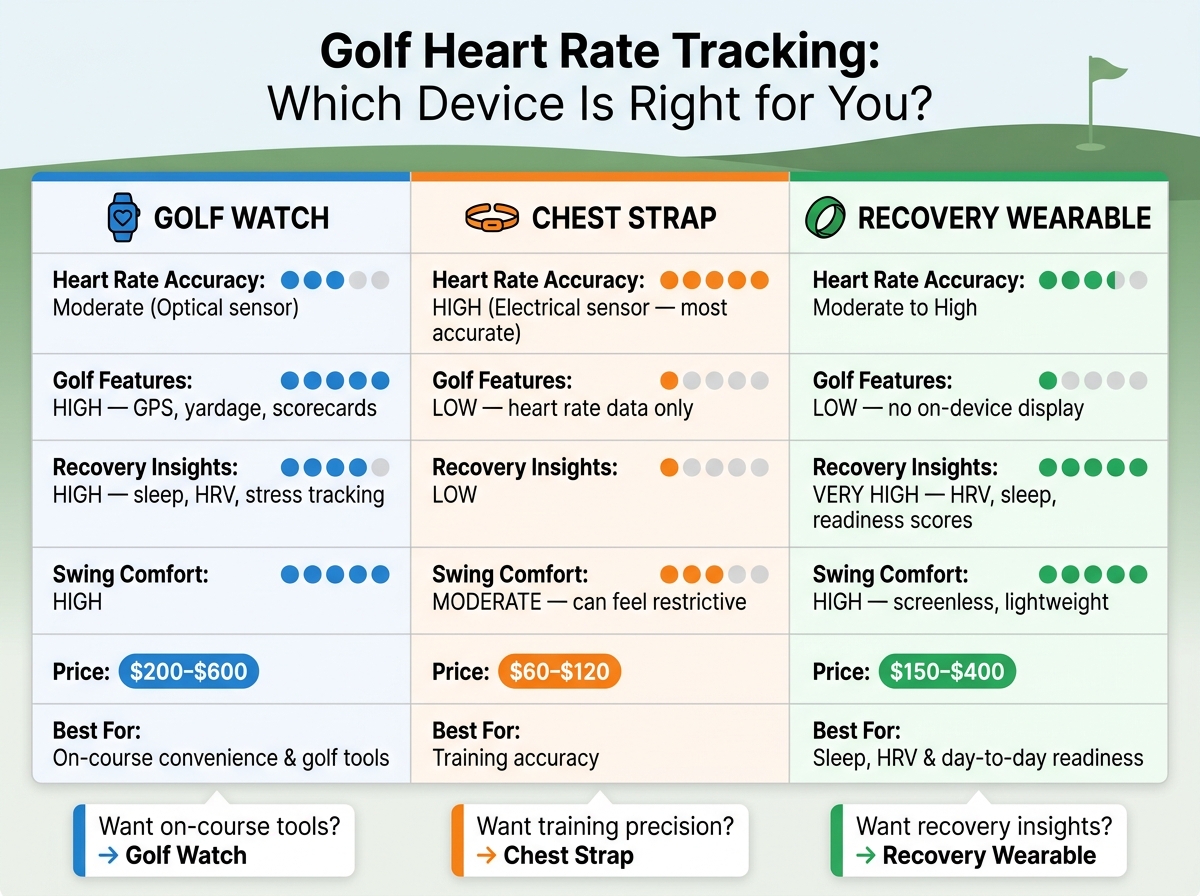
Golf Heart Rate Tracking: Device Comparison Guide
Golf Watch, Chest Strap, or Recovery Wearable: Comparison Table
Once you know if you want course data, training-level heart rate accuracy, or recovery tracking, the right device gets a lot easier to pick.
You do not need the most expensive option. You need the one that fits your main goal.
| Device Type | Heart Rate Accuracy | Golf Features | Recovery Insights | Comfort During Swing | Price (USD) |
|---|---|---|---|---|---|
| Golf Watch | Moderate (Optical) | High – GPS, yardage, scorecards | High – sleep, HRV, stress tracking | High | $200–$600 |
| Chest Strap | High (Electrical) | Low – heart rate data only | Low | Moderate – can feel restrictive | $60–$120 |
| Recovery Wearable | Moderate to High | Low – No on-device display | Very High – HRV, sleep, readiness | High – screenless, lightweight | $150–$400 |
A simple way to think about it:
- Golf watch if you want on-course ease and golf tools
- Chest strap if you want better heart rate accuracy during training
- Recovery wearable if you care most about sleep, HRV, and day-to-day readiness
Pick the device that matches your main goal: on-course convenience, training accuracy, or recovery tracking.
Best Practices for Reliable On-Course Tracking
After you choose a device, set it up the right way so your data stays useful from round to round.
A loose fit can throw off wrist-based readings. Wear your watch snugly above the wrist bone, not on it, so the optical sensor keeps steady contact with your skin during the swing. If you’re using a chest strap in a training session, place it right against your skin, just below the chest muscles.
Charge your device the night before every round. GPS and continuous heart rate tracking can drain battery fast, especially over a 4- to 5-hour round in summer heat.

And when you look at your data, focus on heart rate zones, not calorie estimates, to judge how demanding the round was.
Conclusion: Pair Heart Rate Tracking With Better Practice Habits
The best device helps only if you use the numbers to change how you train and pace yourself.
Heart rate data gives you a clear read on your physical state: how hard you’re working, how well you’ve recovered, and whether your body is ready to play. Use that data to guide your fitness work, then pair it with focused swing practice and golf tips, putting, and course-management work. That’s the mix that lowers scores.
FAQs
How do I know if my heart rate zones are set correctly?
Check that your max HR looks right and that each zone lines up with how the effort feels.
Most systems use a percentage of max HR:
- Zone 1: about 50%–60%
- Zone 2: 60%–70%
- Zone 3: 70%–80%
- Zone 4: 80%–90%
- Zone 5: 90%–100%
Here’s the simple gut check: if an “easy” workout feels too hard, or you can’t seem to hit the top zones at all, your settings may be off.
The most accurate way to find your max HR is with an exercise stress test or a VO2 max test.
Should I use a watch or chest strap for golf?
For the most reliable and precise data, a chest strap is your best bet. Wrist-based sensors have gotten better, but they can still vary during physical activity.
Chest straps track your heartbeat’s electrical signals, so they tend to deliver steadier readings during fast golf swings. Whichever option you use, make sure it fits snugly to help improve data accuracy.
What should I do if my HRV or resting heart rate looks off?
Focus on trends and context, not one random reading. If your HRV stays lower than your baseline, that can point to stress, fatigue, or recovery that isn’t finished yet. And if your resting heart rate is also up more than usual, that can be a sign of overtraining or poor sleep.
In that case, back off the intensity for 1–2 days, put sleep at the top of the list, and then check again. If you train with heart-rate zones, recalculate them based on your updated resting heart rate.
Related Blog Posts
- 5 Metrics To Track Golf Practice Effectiveness
- How WHOOP Tracks Golf Recovery and Sleep
- How Real-Time Feedback Wearables Improve Your Swing
- Ultimate Guide to Golf Band Data Metrics
