
Augmented Reality (AR) is changing how golfers approach putting by offering tools that make green reading, alignment, and speed control easier. AR systems use projectors, glasses, or apps to overlay visuals like contour maps, aim lines, and speed indicators directly onto the green. These tools help golfers understand slopes, aim better, and control distance with precision.
Key takeaways:
- Green Reading: AR highlights slopes and breaks using contour lines and heightmaps.
- Alignment: Systems project aim lines for accurate putter positioning.
- Speed Control: Visual aids show how speed impacts the ball’s path.
- Real-Time Feedback: Metrics like start-line accuracy and ball roll help refine strokes.
From indoor setups like PuttView to portable options like HoloLens-based systems, AR adapts to various practice environments. While AR enhances practice, the goal is to build skills you can rely on during actual play by reducing dependence on visual aids over time.
These glasses READ ANY PUTT In 5.8 seconds!
How AR Technology Works in Putting
AR putting systems bring together sophisticated hardware, software, and display technologies to transform putting practice. The hardware typically includes ceiling-mounted projectors that overlay visuals directly onto the green and high-speed overhead cameras to track the ball’s movement in real-time. Portable systems, like PuttView X, take a different route, using Microsoft HoloLens 2 AR glasses to project information directly into your field of view. This approach allows you to practice on any green without needing fixed equipment.
Types of AR Putting Systems
Projector-based systems are most commonly found in indoor studios or home setups. These systems combine fixed projectors with high-speed cameras to create an interactive putting experience. For example, PuttView offers several models, from the compact P7 Home Series (covering 60 square feet with putts up to 9 feet) to the larger CX2 Custom Series (covering up to 540 square feet with putts reaching 28 feet). At the Rob Mouwen Golf Academy in Heusden, Netherlands, the SAM PuttStudio 8 system pairs projection technology with a tilting platform to simulate various slopes and breaking putts.
Wearable AR systems bring portability to outdoor practice. PuttView X uses Microsoft HoloLens 2 glasses, controlled via a smartphone app, to display contour maps and aim lines on any green – no permanent installation required. Meanwhile, smartphone and tablet apps act as control hubs for most systems, enabling users to select drills, adjust visuals, and review performance data.
Advanced setups often include tilting platforms integrated with AR software. For instance, the PuttView Moving Series (M20) spans 160 square feet and can simulate countless putt scenarios by mechanically adjusting the slope. The AR visuals automatically adjust to match these changes. GOLFTEC Manhattan employs SAM PuttStudio+ technology with Platform Golf’s tilting capabilities, allowing players to practice specific break scenarios with real-time AR feedback.
Each system uses advanced mapping to turn raw data into actionable visual insights.
How AR Maps and Displays Putting Data
AR systems begin by creating a 3D model of the green surface. Indoor setups utilize CNC-milled greens crafted with millimeter precision, while portable systems like PuttView X use HoloLens 2’s spatial mapping to scan any green in real time. After mapping the surface, physics-based algorithms – often incorporating AimPoint technology – calculate the ideal putting line.
The system then projects various visual aids onto the green, including contour maps to highlight elevation changes, ideal lines to show the optimal path, aiming lines to guide your starting point, and speed corridors to illustrate how pace affects the break. Overhead cameras track the ball’s movement and display its path on the green in real time, letting you compare your intended line with the actual result.
"The combination of ball tracking and projection is a game-changer in putt coaching." – Rob Mouwen, SAM Ambassador and Putting Specialist
Indoor greens used in these setups roll at speeds of 10 to 12 on the Stimpmeter, closely mimicking real course conditions. Some systems even integrate with full-swing simulators. For example, Foresight Sports connects directly with PuttView, projecting virtual green data from the simulator onto a physical contoured surface for a seamless transition from tee to green.
By layering mapped data with real-time visuals, AR systems provide insights that refine your stroke.
Visual Feedback and Metrics
AR systems track and display a wide range of performance metrics. Start-line accuracy measures whether you’re aiming in the intended direction, while launch angle shows the ball’s initial trajectory off the putter face. Skid and roll characteristics reveal how quickly the ball transitions from sliding to rolling, and face angle at impact combined with stroke path identifies technical flaws in your putting motion.
SAM PuttStudio+ goes a step further by integrating ball-tracking data with putter-mounted sensors, offering a detailed look at how your stroke influences ball behavior. Arccos Golf takes a unique approach, categorizing putting data into seven distance ranges (e.g., 0–2 feet, 3–5 feet, 6–9 feet, etc.) to help players spot trends in their performance across different distances.
For those who prefer a less cluttered experience, many systems include a "BallTracker-only" mode, allowing players to focus solely on performance metrics without the distraction of projected visuals. Interactive tablets further enhance flexibility, serving as control centers to adjust visuals and access data while moving freely around the green.
Using AR to Improve Your Putting
Augmented Reality (AR) tools are transforming golf practice by improving green reading, ball alignment, and speed control. By integrating advanced mapping and visual feedback into drills, AR brings a modern edge to your putting routine.
Reading Greens with AR
AR technology unveils the hidden nuances of a green, such as slopes and breaks, by overlaying contour lines and color-coded heightmaps directly onto the surface. This visual data helps golfers understand how terrain affects the ball’s path. Systems like PuttView use physics-driven algorithms and even incorporate AimPoint technology to display the "Ideal Line" for the ball to reach the hole.
Apps like Slopegraide leverage built-in LiDAR sensors to scan greens, creating detailed 3D models. These models provide insights such as slope percentages, incline degrees, and whether a putt is uphill, downhill, or flat.
"This technology will now help other golfers see exactly what I see when I read putts on the greens." – Jeff Mocini, Founder and Inventor, Slopegraide
Some AR systems go a step further by animating a virtual ball to demonstrate how the break influences the ball’s path before you even take your shot. You can switch between realistic green views and color-coded heightmaps to train your eye to detect elevation changes without relying entirely on visual aids. For pinpoint accuracy, Bluetooth-enabled smart ball markers paired with AR apps provide exact slope readings right at your ball’s position.
Once the green’s contours are clear, the next step is aligning your putter for a precise start.

Starting the Ball on the Right Line
Proper alignment is key to making your putt – if your aim is off, even the best green reading won’t save you. AR systems project an Aiming Line and alignment corridors onto the green, showing exactly where to position your putter face. Advanced tools also display the ideal backswing and follow-through paths, helping you maintain a consistent stroke.
These systems provide instant feedback, identifying whether the ball veered off-line due to face angle issues or impact errors. For example, TOURPUTT offers a "Pattern Test" that analyzes your performance across different putts, pinpointing tendencies and starting angle errors.
"With the real-time feedback and insights that PuttView X provides, golfers will have the ability to make faster progress towards improving their putting skills." – Justin Sandler, PGA Pro and Foresight Sports Europe Senior Sales Executive
A helpful drill involves layering multiple AR features, like the ideal line and stroke path, to see how your putter movement aligns with the ball’s starting direction. You can also practice hitting different start lines from the same spot to understand how small adjustments to your face angle influence the ball’s break. AR headsets let you train on any green without attaching sensors to your putter or ball, ensuring a natural feel during practice.
Once your alignment is dialed in, the next challenge is mastering speed control.
Controlling Speed and Distance
Speed control is crucial for keeping the ball on its intended line. AR systems assist by projecting the "perfect" putting line based on physics and topography, while also showing the speed needed for the ball to stay on that path. Apps like Slopegraide even calculate and display the ideal backstroke length for achieving the correct rolling speed for a specific putt distance.
With real-time ball tracking, you can analyze launch angle, skid, roll, and path, gaining insights into how your stroke affects the ball’s behavior. This data can reveal if the ball is skidding too much before rolling, which can disrupt distance consistency. On sloped greens, AR visuals adapt to show how speed requirements change with the incline or decline of the surface. Many systems also include gamified drills and challenges to make repetitive speed practice more engaging.
AR glasses often feature a "play as" mode, allowing you to visualize how a putt would break at different speeds – whether hit firmly or just enough to reach the hole. This helps develop a finer touch. Distance markers projected at various lengths are another useful tool for practicing lag putting and improving your feel for longer distances.
| Feature | Benefit for Speed/Distance Control |
|---|---|
| Ball Tracking Camera | Provides real-time data on speed, skid, and distance |
| Backstroke Indicators | Displays stroke length needed for specific distances |
| Pace Dots/Lines | Shows the speed required to follow a given break |
| Distance Markers | Projects targets at various lengths for lag putting practice |
| Slope Heatmaps | Highlights green contours to estimate speed adjustments on slopes |
sbb-itb-bcd8bdd
Choosing and Setting Up an AR Putting System
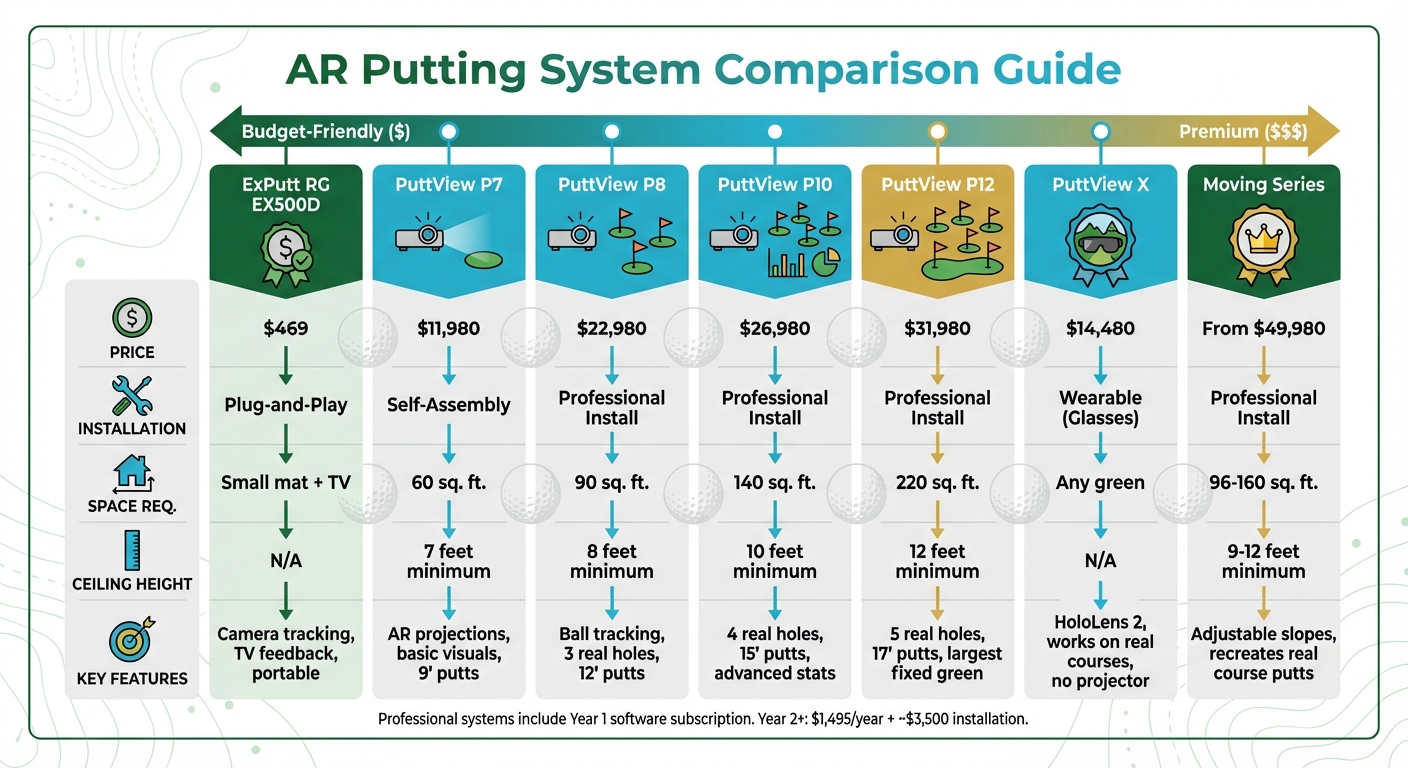
AR Putting Systems Comparison: Features, Prices, and Space Requirements
When selecting an AR putting system, factors like budget, available space, and your practice goals are key. For compact spaces, entry-level options like the ExPutt RG EX500D ($469) offer a camera-based setup with feedback displayed on a TV, making it a practical choice for smaller areas. If you’re looking for something more advanced, the PuttView P7 ($11,980) is a mid-range option that requires a 7-foot ceiling and can be assembled at home. For professional-grade systems, options like the PuttView P8 ($22,980) and P12 ($31,980) require higher ceilings (8 to 12 feet) and include features like ball tracking, multiple real holes, and in-depth analytics. If portability is a priority, the PuttView X ($14,480) uses Microsoft HoloLens 2 glasses, allowing you to practice on any green without needing a fixed installation.
Comparing AR Putting Systems
| System | Price | Installation Type | Space Required | Min. Ceiling Height | Key Features |
|---|---|---|---|---|---|
| ExPutt RG EX500D | $469 | Plug-and-Play | Small mat + TV | N/A | Camera tracking, TV-based feedback, portable |
| PuttView P7 | $11,980 | Self-Assembly | 60 sq. ft. | 7′ | AR projections, basic visuals, 9′ putts |
| PuttView P8 | $22,980 | Professional Install | 90 sq. ft. | 8′ | Ball tracking, 3 real holes, 12′ putts |
| PuttView P10 | $26,980 | Professional Install | 140 sq. ft. | 10′ | 4 real holes, 15′ putts, advanced stats |
| PuttView P12 | $31,980 | Professional Install | 220 sq. ft. | 12′ | 5 real holes, 17′ putts, largest fixed green |
| PuttView X | $14,480 | Wearable (Glasses) | Any green | N/A | HoloLens 2, works on real courses, no projector |
| Moving Series | From $49,980 | Professional Install | 96–160 sq. ft. | 9’–12′ | Adjustable slopes, recreates real course putts |
Professional systems include a first-year software subscription, but starting in year two, you’ll need to budget for a $1,495 annual fee and about $3,500 in installation costs.
Once you’ve chosen a system, setting it up and calibrating it correctly is essential to get the most out of it.
Setting Up and Calibrating AR Systems
Start by measuring your ceiling height to ensure compatibility – systems like the P7 require at least 7 feet, while the P12 needs 12 feet. For projection-based setups, you’ll need to mount a projector and an overhead camera to display real-time putt data. Most systems are controlled via a tablet or touchscreen interface.
"An accurate 3D Model is the foundation of PuttView." – PuttView
Pre-made greens, such as those offered by PuttView Home, are designed with precise measurements, so no additional scanning is required. If you’re using a custom or existing green, professional surveying tools are necessary to create an accurate 3D surface model. Stable WiFi is crucial for seamless communication between the system’s tablet and smartphone apps. Additionally, projection-based systems perform best in controlled indoor lighting conditions to keep the visual aids sharp and clear on the turf.
Proper calibration is vital for ensuring the AR system delivers accurate feedback, giving you reliable data for each putt.
Adding AR to Your Practice Routine
Once your system is set up and calibrated, it’s time to integrate it into your practice routine. Start with a diagnostic "Putt Test" to establish a baseline, then focus on improving key skills like green reading, alignment, and speed control. AR systems create a feedback loop: visualize the projected line, execute the putt, and then review the tracked path to compare your execution with your intentions.
Switch up your routine with drills targeting accuracy, speed, and pressure situations. Use settings like "Random" or "Modify Green" to create endless variations, keeping your practice sessions engaging and productive. If you’re using resources like How To Break 80, incorporate AR metrics such as face angle at impact and stroke path into your drills to reinforce the fundamentals taught in their guides. Combining AR feedback with structured practice plans can help you develop consistency and improve your game more effectively than relying on either approach alone.
Applying AR Practice to On-Course Play
Reducing Reliance on AR Visual Aids
The purpose of AR practice isn’t to make you overly dependent on digital overlays – it’s about training your eyes and building a mental catalog of successful putts. Over time, reduce your reliance on visual aids by switching between display modes. For instance, use color-coded heightmaps, realistic patterns, or even turn off overlays completely to sharpen your visualization skills.
"We have created a new way for competitors, coaches, and caddies to prepare for tournament rounds and train visualization skills that are imperative for playing great golf." – Jeff Mocini, Founder and Inventor, Slopegraide
One effective method is to disable the green display while keeping the virtual ball path visible. This lets you confirm your read while mentally visualizing the break and slope of the green, just like when the overlay was active. AR tools can also help you master backstroke lengths for various slopes. Once you’ve practiced these on an AR system, replicate the same strokes on a traditional green. For outdoor greens, systems like the PuttView X – priced around $14,480 and powered by HoloLens 2 technology – offer a way to practice with visual guidance while adapting to real course conditions. Gradually reducing digital cues ensures you’re ready to apply these skills directly on the course.
Building a Consistent On-Course Routine
After refining your visualization techniques through AR practice, carry these habits into your on-course routine. Use the visualization methods you’ve developed to enhance your pre-shot routine. For example, identify the "AimPoint" or the peak of a break, just as your AR system would guide you. Companion apps with features like "Preview Caddie" can also be a big help, allowing you to download course maps and plan your strategy before stepping onto the first tee.
Base your warm-up on insights from your AR sessions. Focus on areas where you’ve struggled in the past – like 6–9-foot putts – and dedicate extra time to those distances. After your round, review your shot data. Simple adjustments, such as reclassifying a fringe putt as a chip, can ensure your analytics accurately reflect your performance.
Tracking Progress and Lowering Scores
Putting makes up about one-third of all strokes in an average round. To track improvement, break down your performance into detailed distance brackets – 0–2 ft, 3–5 ft, 6–9 ft, 10–14 ft, 15–24 ft, 25–39 ft, and over 40 ft. Compare your on-course "Strokes Gained" data to your AR practice stats to see if skills like green reading and speed control are translating to actual play.

"Having introduced the multiple putt tracking feature last year, we’ve now taken it further to provide even more specific insights for Arccos members to help them improve their putting through smarter practice on the putting green or at home." – Dave LeDonne, Vice President of Product, Arccos
AR tracking can also help you pinpoint distances where 3-putts are most common, so you can focus your practice on improving distance control. In 2021, new Arccos members who played at least ten rounds lowered their handicap by an average of 5.78 strokes. By combining AR insights with on-course data, you create a seamless strategy for improving your game. Regularly running a "Putt Test" on your AR system can help you set benchmarks, track progress, and identify areas for improvement. Metrics like face angle at impact and stroke path, when paired with real-world performance data, give you a clear roadmap for where to focus your efforts.
Conclusion
Augmented Reality (AR) is revolutionizing the way golfers approach putting, shifting it from guesswork to a precise, data-driven process. By projecting ideal putting lines, offering real-time feedback on stroke mechanics, and illustrating the effects of friction and gravity, AR technology provides tools to improve one of the most technical parts of the game. Whether you’re fine-tuning your green reading with topographical overlays or working on speed control through speed corridors, AR targets the factors that influence about one-third of your strokes.
But AR’s real value goes beyond the digital aids – it helps you build a mental library of successful putts. Over time, this mental database becomes a resource you can rely on when digital tools aren’t available. As you move from practice sessions to actual play, the visualization techniques and consistent stroke patterns you develop will become second nature. Tools like PuttView not only help you master the measurable aspects of putting – such as read, line, and speed – but also lay the foundation for a more confident and reliable putting game.
"PuttView X enables you to stop guessing and instead know what you need to work on to get better." – PuttView
While AR is a game-changer for putting, it’s just one piece of the puzzle. To truly elevate your game, it’s essential to develop skills across all areas of play. For resources that cover everything from fixing your slice to adding distance to your drives, check out How To Break 80. Their eBooks, video courses, and drills provide practical strategies to help you build a well-rounded game that goes far beyond the putting green.
FAQs
How does augmented reality enhance putting performance on the golf course?
Augmented reality (AR) technology is changing the way golfers approach their putting game. By overlaying critical details – like the contours of the green, its slope, and the optimal putting line – directly onto the surface in front of them, players gain instant visual feedback that helps them read the green more effectively and refine their aim and stroke.
With real-time data on elements such as speed, break, and alignment, AR empowers golfers to sharpen their technique and make smarter decisions. The result? Improved confidence and precision when it matters most on the course.
What’s the difference between projector-based and wearable AR systems for putting practice?
Projector-based AR systems and wearable AR glasses both bring visual aids to putting practice, but they take different approaches in how they function and fit into your routine.
With projector-based systems, the green itself becomes your display. These systems project the perfect line, break, and pace right onto the surface, offering a clear and stable visual guide. They’re great for group use since multiple players can easily see the projections. However, they’re not exactly portable. You’ll need a fixed indoor or covered space and mounted hardware to use them, which limits where you can practice.
Wearable AR glasses, on the other hand, bring the data directly to your field of view through head-mounted technology. They’re lightweight and can go with you to any green, offering unmatched flexibility. But they do come with a few trade-offs. You’ll need to wear a headset, keep the batteries charged, and be prepared for a steeper upfront investment.
So, if you’re looking for a stable setup for indoor practice, projectors are the way to go. But if you want something portable and adaptable for outdoor greens, wearable AR glasses are your best bet.
How can golfers move from using AR putting aids to improving their natural putting skills?
Augmented reality (AR) putting aids are a game-changer for golfers, offering visual feedback on key elements like green slope, break, and stroke mechanics. These tools are fantastic for pinpointing areas that need work. But here’s the thing: true, long-term improvement comes from moving beyond reliance on technology and building a natural feel for putting.
Start by incorporating AR aids into short practice sessions. Use them to analyze your stroke and understand how you read greens. Then, take a step back – try the same putts without the AR system. Pay attention to the sensations in your stroke, such as your tempo, weight shift, and alignment. Gradually scale back your use of AR tools, reserving them for occasional check-ins rather than constant use.
To solidify these gains, mix AR insights with tried-and-true drills and tools. For instance, laser alignment aids can sharpen your stroke path, while instructional books or guides can provide drills to fine-tune your grip, tempo, and green-reading skills. By blending AR feedback with hands-on practice and traditional methods, you’ll build a putting stroke that’s both reliable and adaptable to any green.
Related Blog Posts
- Top 7 Laser Putting Aids for 2025
- How PGA Pros Achieve High One-Putt Rates
- Top 5 Real-Time Putting Stroke Analyzers 2025
- How to Use Putter Alignment Aids Effectively
