
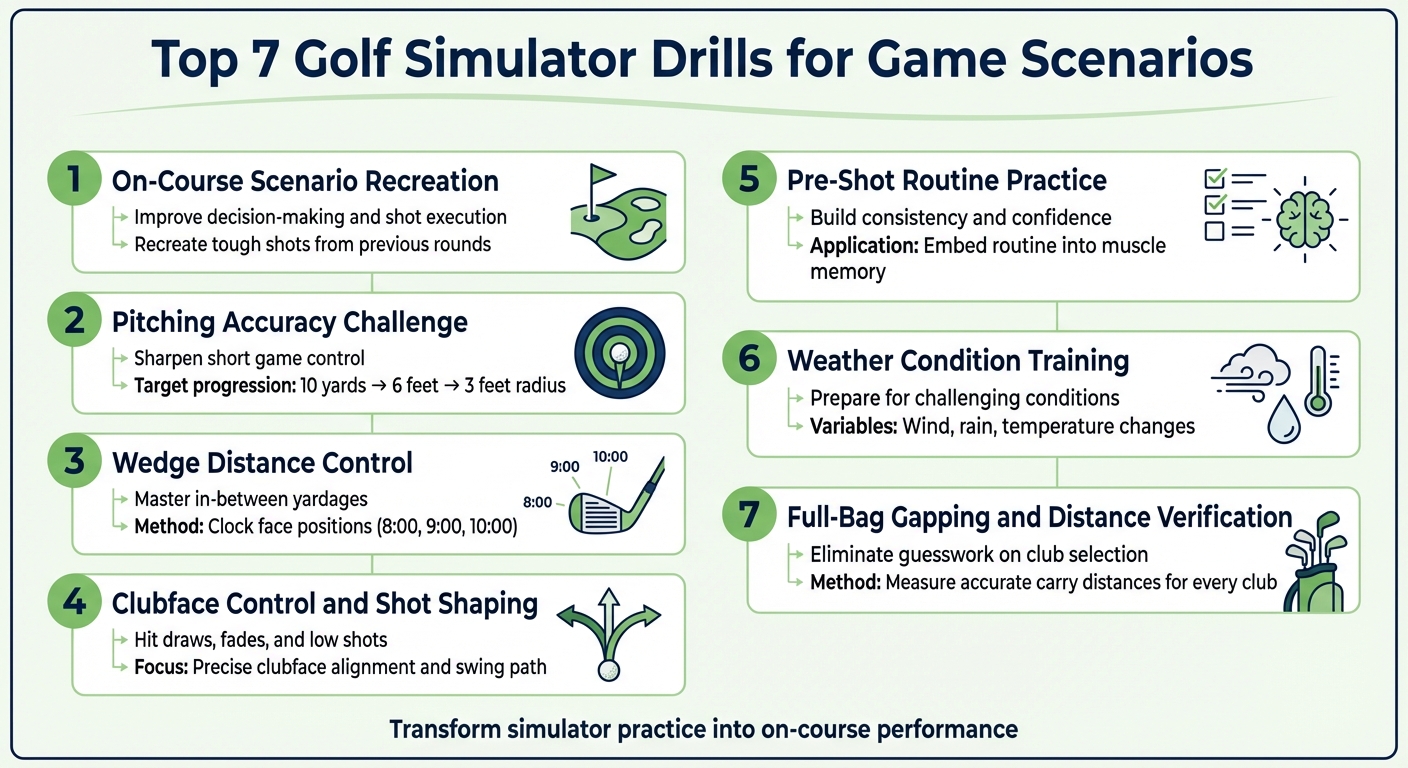
Golf simulators are more than just a tool for practicing your swing – they allow you to recreate real-course challenges, improve decision-making, and hone critical skills like shot shaping and distance control. This guide outlines seven drills designed to make your simulator practice more effective, helping you translate those sessions into better on-course performance:
- On-Course Scenario Recreation: Practice tough shots you’ve faced before, like hitting out of deep rough or dealing with crosswinds, to improve decision-making and execution.
- Pitching Accuracy Challenge: Sharpen your short game by targeting specific distances and tightening your wedge control.
- Wedge Distance Control: Master in-between yardages using a structured wedge matrix for consistent carry distances.
- Clubface Control and Shot Shaping: Learn to hit draws, fades, and low shots with precise clubface alignment and swing path adjustments.
- Pre-Shot Routine Practice: Build a consistent routine to stay focused and confident under pressure.
- Weather Condition Training: Simulate wind, rain, or temperature changes to prepare for challenging course conditions.
- Full-Bag Gapping and Distance Verification: Measure accurate carry distances for every club to eliminate guesswork on the course.
These drills ensure every simulator session is purposeful, helping you refine skills and gain confidence to perform better during actual rounds.
7 Essential Golf Simulator Drills for Improving Game Performance
1. On-Course Scenario Recreation
Realism of Game Scenarios
A golf simulator’s strength lies in its ability to recreate the exact challenges you faced during your last round. Imagine struggling with a tricky shot – now you can load that same scenario and practice it repeatedly until you feel confident. Advanced simulators take it up a notch by factoring in elements like wind, rain, or tough lies in deep rough, forcing you to adapt your club selection and shot trajectory. You can even experiment with different strategies on the same virtual hole – try a driver on one attempt and a hybrid or 3-wood on the next, then analyze the results using Strokes Gained data. These realistic setups don’t just test your skills; they prepare you to handle similar situations with ease during real rounds.
Skill Improvement Focus
Practicing on-course scenarios sharpens your decision-making and shot selection. By deliberately placing your virtual ball in tough spots – under trees or in fairway bunkers – you can work on recovery shots and expand your options for tricky situations. The simulator’s detailed feedback can help pinpoint whether your struggles stem from club choice, alignment, or swing mechanics, offering clear direction for improvement. These insights translate directly to better performance on the course, helping you make smarter decisions and execute with more confidence.
Practical Application to On-Course Performance
To make your simulator practice count on the actual course, approach every shot as if it’s the real deal. Pick a precise target, go through your full pre-shot routine, and play a "One-Ball Round" where every stroke matters – no mulligans allowed. This approach mimics the pressure of real play, helping you understand the true cost of each shot.
"One of the biggest simulator mistakes? Treating it like a video game instead of a practice tool."
– Britt Olizarowicz, Golf Professional
How To Practice On A Golf Simulator
2. Pitching Accuracy Challenge
This drill is designed to sharpen your short game by simulating realistic on-course scenarios, helping you fine-tune your pitching precision.
Skill Improvement Focus
Start by choosing a target within your pitching range. Hit 10 consecutive shots, aiming to land them within a 10-yard radius. Once you can do this consistently, narrow the target area to 6 feet, and eventually to just 3 feet. This step-by-step method enhances your control with wedges, an essential skill for lowering your scores. If your goal is to break 80, focus on achieving wedge carry distances accurate within ±3 yards and landing at least 4 out of every 5 shots within 20 feet of the target when pitching from 50–100 yards.
"The more you minimise the margin for error, the better you will become with your pitching accuracy."
– Steven Joy, Golf Swing Systems
Ease of Execution in a Simulator Environment
Golf simulators make it easy to set precise targets at any distance, removing the limitations of a traditional range. They provide exact carry distance data, eliminating the guesswork caused by unpredictable turf roll. Use the simulator’s short game mode for quick and efficient practice sessions. Many simulators also include distance randomizers, which challenge you to adjust to different yardages, replicating the one-shot nature of real golf. These features ensure that your focused practice in the simulator translates seamlessly to real-world play.
Practical Application to On-Course Performance
Record your average carry distances for half, three-quarter, and full swings with each of your wedges. Practice standard greenside distances – such as 8, 20, and 45 yards – while following your full pre-shot routine as if you were on the course. This disciplined practice method builds confidence and prepares you for tricky situations, like a 40-yard pitch with a bunker between you and the pin.
3. Wedge Distance Control
Sharpening Your Skills
Once you’ve honed your pitching accuracy, the next step is mastering wedge distance control – a skill that can elevate your approach game. This is what separates good golfers from great scorers. The 20- to 60-yard range is often where matches are decided, yet many golfers struggle with these "in-between" distances because they don’t involve full swings or simple chips. To tackle this, create a wedge matrix by practicing three specific backswing positions: 8:00, 9:00, and 10:00 on the clock face with your lead arm. Each position generates a distinct carry distance for every wedge, giving you a total of nine reliable yardages. This structured method forms the backbone for productive simulator sessions, where you can refine your consistency with precise, real-time feedback.
"Wedge distance control can be one of the biggest improvements anyone can make to their golf game."
– Tyler, PEAK certified instructor, Big Tees Golf World
Why Simulators Are Perfect for Wedge Practice
Simulators are particularly effective for improving wedge play because they eliminate the variables caused by turf conditions, focusing solely on carry distance. They provide instant feedback on ball speed, launch angle, and spin – key data points that help you recognize when swinging harder starts to compromise your contact quality. This variety in practice ensures you’re not just repeating the same shot but actively improving your feel and accuracy.
Translating Practice to the Course
Start with a Progressive Challenge: aim to land three out of five shots within 5 yards of a 50-yard target. Once you achieve this, move to a 75-yard target. If you miss at the longer distance, go back to the previous one until you succeed. To achieve elite-level precision, work toward keeping your carry distances consistent within ±3 yards. By knowing your exact yardages for each wedge, you can eliminate guesswork and approach every shot with confidence.
4. Clubface Control and Shot Shaping
Skill Improvement Focus
Once you’ve started using simulator feedback to refine your swing, the next step is mastering clubface control to shape your shots. This skill is all about aligning your clubface and swing path to influence ball flight. For example, to hit a draw, your club path should move right of the target (for right-handers) while the clubface points slightly left of that path. To hit a fade, reverse the setup: swing left of the target with the face pointing slightly right of the path. Simulators make this process easier by giving you instant feedback on face angle and club path, helping you pinpoint why the ball slices or hooks instead of relying solely on visual cues.
"Simply put, the ball starts where the face is pointing, and the ball curves away from the path."
– Todd Casabella, GOLF Teacher to Watch
Practicing Shot Shaping in Simulators
Simulators are an excellent tool for practicing shot shaping because they provide instant data on key metrics like spin and launch angle. Two drills that work particularly well in this environment are the String Drill and the Motorcycle Drill.
- String Drill: Lay an alignment stick on the simulator floor to represent your target line. For a draw, practice swinging to the right of the stick while keeping the clubface pointed at the top of it. For a fade, swing to the left while maintaining the same alignment.
- Motorcycle Drill: Focus on flexing your lead wrist (bowing it) during the downswing. This helps square the clubface earlier, reducing the chances of slicing the ball.
These drills not only help in the simulator but also translate well to on-course play, building muscle memory for consistent clubface control in real-world conditions.
Bringing Simulator Practice to the Course
The insights you gain from simulator practice can directly improve your on-course performance. Developing a reliable "stock shot" gives you a go-to option during high-pressure moments on the course. To refine this, exaggerate ball curves during simulator practice to heighten your control and awareness. You can also use the simulator’s weather features to simulate challenging conditions, such as practicing low "knockdown" shots in high winds – an essential skill for controlling ball flight in real-life scenarios.
As a goal, aim to hit 7 out of 10 shots into a virtual 30-yard fairway window. For a more advanced challenge, try to maintain a dispersion circle of less than 10% of your total yardage, a standard that elite golfers strive to meet.
sbb-itb-bcd8bdd
5. Pre-Shot Routine Practice
Skill Improvement Focus
A steady pre-shot routine is just as crucial in a simulator as it is on the actual course. It serves as a mental anchor, especially when the pressure is on. As Will Shaw, PhD, MSc, PGA Pro, puts it:
"A great pre-shot routine is a safety blanket when you’re faltering under pressure."
Practicing in a simulator helps embed this routine into your muscle memory. Instead of obsessing over yardage, wind, or which club to use, your focus shifts to confidently executing your shot. This mental shift eliminates doubt and keeps your attention on making a solid swing. Plus, it prepares you to use the simulator’s features to replicate real-course challenges effectively.
Ease of Execution in a Simulator Environment
Simulators make it easy to practice your routine under various conditions. Use randomized distances and adjustable weather settings to pause between shots and fully engage in your pre-shot routine. These features mimic the unpredictability of real play, requiring you to go through the entire decision-making process before each swing.

Practical Application to On-Course Performance
A well-practiced routine not only calms your mind but also improves your performance when it matters most. On the course, try this four-step process: visualize your target, step forward with confidence to transition from planning to action, set your clubface and grip, and initiate your swing with a consistent trigger – like a deep breath or a club waggle. After your simulator session, review your ball-striking data to assess how consistently you followed your routine. This methodical practice builds the automatic habits you need for high-pressure rounds and tournaments.
6. Weather Condition Training
Realism of Game Scenarios
Weather condition training takes the idea of realistic course simulations a step further by preparing you to handle various environmental factors. With modern golf simulators, you can adjust settings like wind speed, precipitation, and temperature in just a few clicks. Want to see how a 15mph headwind or crosswind affects your shot? No problem. As Britt Olizarowicz, Golf Professional, puts it:
"You can even simulate weather conditions, add wind to your session, and learn how it affects your ball flight. If a certain shot gives you anxiety on the course, build confidence by practicing it in a controlled environment."
The simulator’s advanced physics engine ensures that these conditions feel as close to real-life as possible. Whether it’s a headwind pushing against your drive or a crosswind altering your shot shape, this feature allows you to refine your skills and adapt to changing scenarios.
Skill Improvement Focus
Weather training isn’t just about replicating tough conditions – it’s about improving your ability to manage them. For instance, practicing low "stinger" shots in windy conditions can help you keep the ball under gusts, while experimenting with tailwinds shows how much extra distance you can gain. Steven Joy from Golf Swing Systems explains:
"Playing with the weather settings on your simulator can help you learn how to change your shot selection depending on the weather."
You can even create a personalized distance chart that accounts for variables like temperature and rain. This kind of preparation gives you a handy reference for making smarter decisions when you’re out on the course.
Ease of Execution in a Simulator Environment
Setting up weather drills in a simulator is incredibly straightforward. You can toggle variables like wind speed and direction – say, a 15mph wind – and practice the same shot repeatedly to see how conditions affect distance and trajectory. Features like autorewind let you replay the exact same swing under different weather scenarios, helping you understand how small changes in conditions can impact your performance.
Practical Application to On-Course Performance
Simulating weather conditions in a controlled environment builds your confidence for the real thing. When you encounter a gusty headwind during a round, you’ll already know how your club behaves because you’ve practiced that exact scenario. The ability to rehearse these situations over and over ensures you’re ready to handle whatever the course throws your way.
7. Full-Bag Gapping and Distance Verification
Skill Improvement Focus
Gapping is all about understanding how far each club in your bag carries the ball and identifying the gaps between them. Surprisingly, many golfers rely on guesswork when it comes to their distances, which often leads to poor club choices and wasted strokes on the course. A simulator offers a controlled setting to measure these distances accurately, focusing on carry distance rather than total distance, which is far more dependable. Will Shaw, PhD, PGA Pro, highlights this simple yet impactful practice:
"Working out how far you hit each club (your gapping) is one of the simplest ways to lower your scores – you don’t have to spend hours changing your golf swing, one task and you will hit your shots closer!"
The process is straightforward: hit 5–10 shots per club, remove any outliers, and calculate the average carry distance from the remaining shots. To get the most out of this, begin with your scoring clubs – like wedges and short irons – where accuracy is critical, and then move up through the rest of your bag. Be sure to use the same ball you play with on the course since range balls typically fly only 80–90% as far. This drill not only sharpens your precision but also maximizes the potential of simulator technology to improve your game.
Ease of Execution in a Simulator Environment
Modern launch monitors make this process even easier with built-in bag mapping tools that automatically record data and calculate averages for you. Systems like SkyTrak+, Foresight GC3, and Uneekor Eye XO2 take care of the math, so you can focus on your swing. To get accurate results, warm up for about 10 minutes before starting to ensure your swing reflects your actual playing rhythm. Unlike outdoor range sessions, simulators eliminate variables like wind and inconsistent turf, giving you a clean and reliable baseline for every club in your bag.
Practical Application to On-Course Performance
Armed with precise carry distances, you’ll approach on-course situations with greater confidence. Marc Sheforgen, Golf Writer, emphasizes the impact this can have:
"Once you know your real numbers, club selection becomes way easier. And with that, your confidence increases. That allows you to better commit to each shot."
For example, when you’re staring down a 150-yard water hazard, you’ll know exactly which club to pull. This drill also helps you identify overlapping distances between clubs – where two clubs might carry the same distance – so you can fine-tune your equipment setup and remove any redundancies. By refining your club selection and understanding your distances, you’ll be better prepared to tackle any challenge on the course.
Conclusion
The seven drills outlined here transform your simulator into a powerful training tool that directly enhances your on-course performance. By practicing with structure – whether it’s dialing in your distances, shaping shots around tricky doglegs, or adjusting to simulated wind – you develop the decision-making skills and muscle memory that separate consistent players from those who struggle with inconsistency.
This kind of focused practice is key to turning effort into lower scores. As Golf Professional Britt Olizarowicz puts it:
"Commit to your pre-shot routine on every simulated shot: This is what allows simulator practice to translate to real scoring improvement."
By committing to these exercises, you’re not just improving your technique; you’re also building the confidence to perform under pressure. When you visualize your shot, pick a target, and stick to your routine during simulator sessions, these habits naturally carry over to the course. Pair that with data-driven insights – like clubface angle, spin rates, and carry distances – and you’ll fine-tune both your diagnosis and execution.
For golfers ready to take their practice to the next level, How To Break 80 offers a wealth of resources. From eBooks and video courses to free guides on putting mechanics and distance control, this platform provides a complete roadmap to help you transition from mid-handicap play to consistently breaking 80 – both on the simulator and out on the course.
FAQs
How can a golf simulator help me make better decisions on the course?
Using a golf simulator can be a fantastic way to sharpen your decision-making skills by mimicking real-game scenarios. Begin by choosing a course or hole you’re familiar with to recreate specific situations you’d encounter on the course. Take advantage of the simulator’s detailed data – like launch angle, spin, carry, and distance – to get a clearer picture of how each club performs.
In each scenario, focus on selecting the right club, aiming for an appropriate target, and deciding on the best swing type. Go through your full pre-shot routine, just as you would during an actual game, and then review the results to see how your decisions stack up against the outcomes. By consistently practicing and analyzing the data, you’ll refine your strategy and grow more confident in your choices when you’re out on the course. For an extra edge, try incorporating simulator-specific drills, such as those offered by How To Break 80, to make your practice sessions even more effective.
What are the best golf simulator drills to improve wedge distance control?
Improving wedge distance control in a golf simulator requires focused practice with specific drills that emphasize precision and consistency. Start with a distance chart drill: hit shots from 20 yards, increasing in 5-yard increments up to 50 yards, while recording your carry distances. Use the simulator’s shot history to review your performance, and adjust your swing length and tempo as needed.
Next, work on a target radius drill by selecting a virtual pin or a defined area on the screen. Hit ten wedge shots, aiming to land each one within the target zone. Rotate between different wedges – such as a 50°, 54°, or 58° – to refine your swing speed and improve clubface control. To enhance your technique further, try a feel drill by placing a towel under your arms. This helps promote proper chest rotation and improves your downswing path for both partial and full wedge shots.

To ensure consistent results, create a wedge matrix. This is a chart where you list your average distances for various swing lengths, such as ¼, ½, and ¾ backswing. Refer to it during practice to develop a dependable feel for each yardage. These drills not only improve your distance control but also boost your confidence for on-course play.
How can weather simulations in golf simulators improve your on-course performance?
Golf simulators take practice to the next level by replicating weather conditions like wind, rain, or cooler temperatures, creating an environment that feels closer to the challenges of playing on an actual course. These simulations tweak factors like ball flight, spin, and launch angles to show how weather impacts performance, giving golfers a chance to fine-tune their club selection, shot techniques, and overall strategy.
With instant feedback on how conditions affect carry distance, roll, and shot dispersion, players can gain valuable insights and build confidence in handling tough weather. This kind of preparation helps golfers make smarter decisions and execute better shots when facing unpredictable conditions on the course.
Related Blog Posts
- Golf Practice Checklist: 8 Drills for Weekend Warriors
- Wind vs. Rain: Playing in Tough Conditions
- Top Drills for Shaping Shots in Wind
- Best Course Strategy Simulators for Golfers
