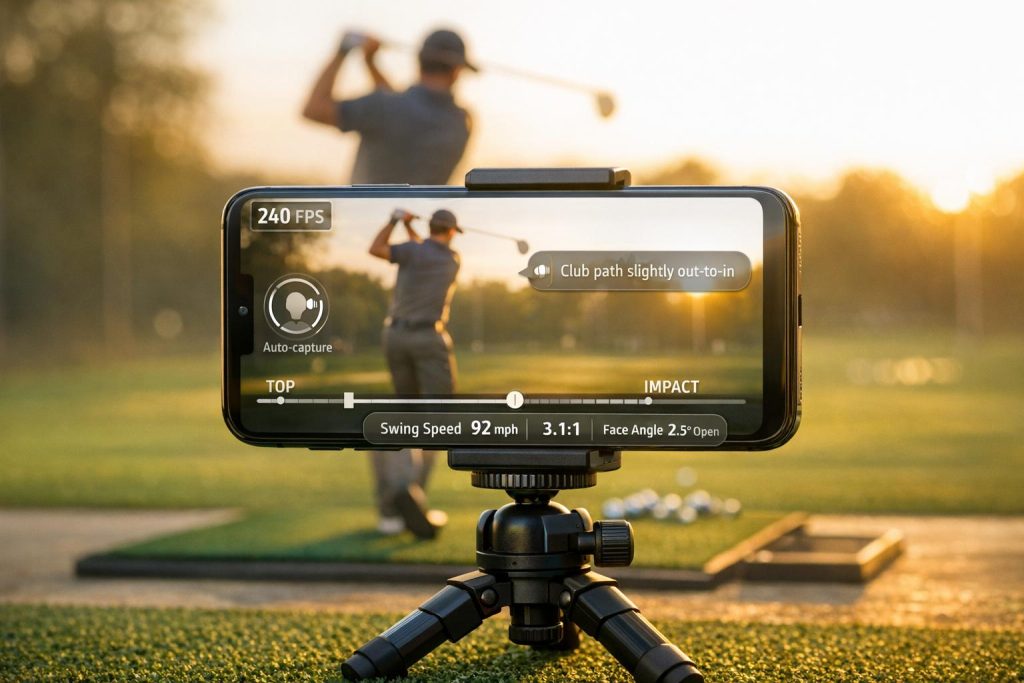
Golfers often hit a wall in their progress because they lack clear feedback on their swings. Swing analysis apps solve this by using tools like video capture, AI, and motion sensors to provide precise data. But not all apps are created equal. Here are the five features you should prioritize when choosing one:
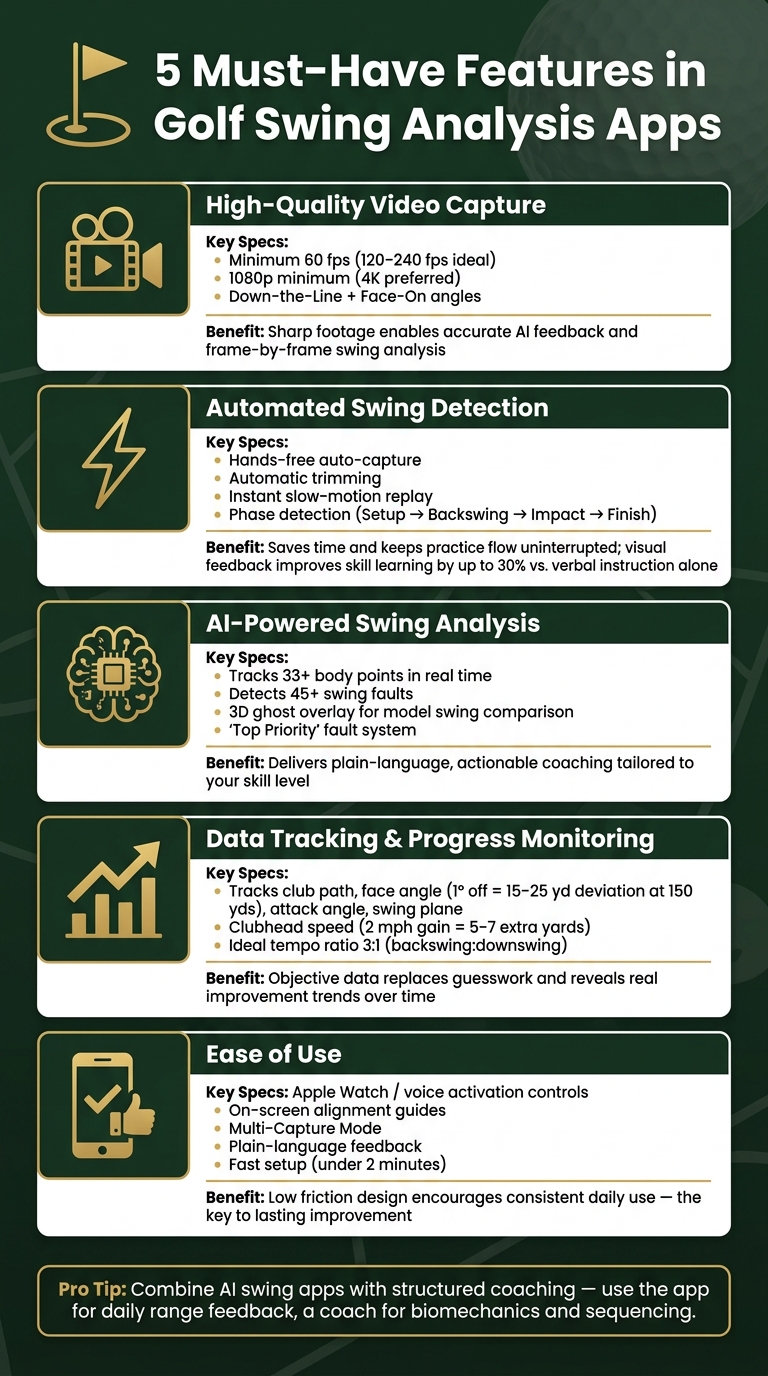
- High-Quality Video: Look for apps that support at least 60 fps (120–240 fps is better) and 1080p resolution (4K preferred). Multi-angle recording (Down-the-Line and Face-On) is a must for detailed analysis.
- Automated Swing Detection: Hands-free auto-capture, instant slow-motion replay, and automatic trimming save time and improve practice flow.
- AI-Powered Feedback: Advanced AI tools detect swing faults, track body movement, and offer actionable advice tailored to your skill level.
- Data Tracking: Apps should log metrics like club path, face angle, and swing plane, while offering progress dashboards for tracking improvement over time.
- Ease of Use: A simple interface, quick setup, and features like voice activation or Apple Watch controls ensure consistent use.
Want to improve faster? Combine these tools with proven golf tips and structured coaching for better results. Below, we dive deeper into each feature and why it matters for your game.
5 Must-Have Features in Golf Swing Analysis Apps
The BEST Swing Analysis App I’ve Tried in 30 Years
sbb-itb-bcd8bdd
1. High-Quality Video Capture and Playback
Video forms the backbone of any swing analysis app. Without sharp and detailed footage, features like AI feedback, data overlays, and progress tracking lose their effectiveness. Clear video is the starting point for meaningful swing analysis.
What to Look for in Video Features
When it comes to video features, two key metrics stand out: frame rate and resolution. To ensure smooth slow-motion playback, the app should record at a minimum of 60 fps. For even better results, look for apps that support 120 fps or 240 fps, which are ideal for capturing fast movements like a downswing without motion blur. Modern iPhones, for instance, can record at 240 fps using rear cameras, making them a top choice for swing analysis. As for resolution, 1080p is generally sufficient, but 4K provides sharper detail, which is especially useful for analyzing finer aspects like grip and clubface angles.
Another critical feature is multi-angle support. The two must-have perspectives are Down-the-Line (DTL) – filmed from behind the golfer to assess swing path – and Face-On (FO) – filmed from the front to evaluate weight shift and body movement. Some advanced apps even allow simultaneous recording of both angles, which can significantly enhance your analysis.
These video features create the foundation for accurate feedback, enabling you to see how technology can elevate your practice sessions.
Why Video Feedback Helps Your Swing
Even experienced golfers are often surprised by how their swing looks on video. What might feel like an upright and smooth backswing can appear completely different on screen. This is where slow-motion playback and frame-by-frame scrubbing become invaluable, allowing you to break down and analyze key moments in your swing.
Chuck Quinton, a Golf Biomechanics Researcher, emphasizes the importance of slow motion:
"Without slow motion, you cannot see the downswing sequence clearly."
With frame-by-frame tools, you can take your analysis further by using on-screen drawing features to trace your swing plane, measure shoulder rotation, or check your spine angle. This transforms raw footage into actionable insights that you can use to fine-tune your technique.
Video Features Checklist
Before choosing a swing analysis app, make sure it meets these essential video requirements:
- Frame rate: Look for at least 60 fps, with 240 fps being ideal for capturing impact details.
- Resolution: Ensure the app supports a minimum of 1080p, with 4K as the preferred option for detailed analysis.
- Slow-motion scrubbing: Verify that you can step through footage frame-by-frame, not just play it back at reduced speed.
- Multi-angle support: Check if the app allows two-device sync for simultaneous Down-the-Line and Face-On recording.
- Camera stability: Use a tripod to avoid shaky footage; handheld recording can compromise accuracy. Position the camera 4–6 feet away from you at waist-to-chest height.
- Lighting: Always film with the light source (like the sun) behind the camera to prevent shadows from obscuring your view.
- Lens cleanliness: Wipe your smartphone lens before every session. Dust and fingerprints can blur your footage, ruining slow-motion clarity.
2. Automated Swing Detection and Instant Feedback
With high-quality video already in place, the next step is leveraging automation to streamline recording and provide immediate feedback.
Manually walking back and forth to hit "record" not only disrupts your practice flow but also wastes valuable time. This is where automation steps in to make the process smoother and more efficient.
Key Automation Features to Look For
One of the most practical features is hands-free auto-capture – the app automatically starts recording when it detects your swing. Pair this with automatic trimming, which removes unnecessary footage before and after each swing, keeping your video library clean and organized without the need for manual edits. Another must-have is instant slow-motion replay, allowing you to review your performance immediately after each swing.
Some advanced apps go a step further by breaking your swing into specific phases for detailed analysis. On top of that, voice prompts can signal when the app is ready, helping you stay focused without needing to check the screen constantly.
These features not only save time but also make the entire recording process more efficient, creating an environment for faster progress.
How Automation Makes Practice More Efficient
"The benefit is receiving rapid, targeted feedback to shape your next rep." – Me And My Golf
Immediate feedback bridges the gap between what you think you did and what actually happened on camera. This connection helps you make adjustments before bad habits take root. Research even shows that visual feedback can enhance skill learning by up to 30% compared to verbal instruction alone. Plus, apps with on-device processing analyze footage locally, providing results almost instantly – even in areas with weak Wi-Fi or cellular signals. This constant loop of hitting and reviewing is where meaningful improvement begins.
Automation Features Checklist
Before choosing an app, make sure it checks these essential boxes:
- Auto-capture reliability: Test the app in your practice setting to ensure it reliably detects your swings.
- Instant replay speed: Verify that replays load quickly – within seconds of your swing.
- Automatic trimming: Confirm the app removes unnecessary footage so your video library stays tidy.
- Phase detection: Look for apps that identify key swing positions like Setup, Backswing, Impact, and Finish for targeted analysis.
- Offline functionality: Ensure the app works without an internet connection, which is ideal for outdoor practice sessions.
- Camera placement: Use a tripod positioned about 8 feet away at a consistent height for reliable auto-detection.
With these features in place, automation not only simplifies your practice but also accelerates your path to improvement.
3. AI-Powered Swing Analysis and Coaching Tools
After automation takes care of recording, AI steps in to analyze your swing and provide tailored feedback to help you improve.
What to Look for in AI Tools
The best AI tools do more than just draw lines on your swing video. Look for apps that feature automatic pose and skeleton tracking, which map over 33 body points in real time. This technology measures key elements like joint angles, hip rotation, shoulder turn, and spine stability – all without requiring physical sensors. Advanced tools can also detect over 45 specific swing faults, such as over-the-top motions, early extension, "chicken winging", and improper weight shifts.

Other must-have features include swing comparison tools, where a 3D ghost overlay lets you see a model swing alongside your own. Additionally, a "Top Priority" fault system is invaluable – it highlights your most critical issue instead of bombarding you with excessive data. Spencer Lanoue, Founder of Caddie AI, emphasizes this point:
"A good app doesn’t just show you that your club is ‘off plane.’ It should tell you in plain language what to do about it."
With this level of analysis, AI tools provide clear guidance for immediate swing adjustments.
How AI Supports Swing Improvement
AI takes feedback to the next level by connecting swing data to actionable advice. It helps bridge the gap between what your swing feels like and what it actually looks like on camera, identifying subtle differences that are often invisible to the naked eye.
Many coaches suggest combining AI tools with traditional coaching for the best results. Use AI for daily practice and drills to reinforce mechanics, while relying on a human coach for more complex issues like biomechanics and mental strategies. This balance ensures you don’t neglect proven golf strategy tips that complement technical improvements. This approach allows AI to handle repetitive, data-driven feedback while a professional focuses on refining the finer details of your game.
AI Features Checklist
Before choosing an app, consider these essential features:
- Skill-level matching: The AI should tailor its feedback to your experience. Beginners and advanced players need different types of guidance.
- Fault prioritization: A clear "Top Priority" fix is more effective than a long list of metrics. Focus on one issue for 2–4 weeks, completing 200–500 focused repetitions.
- Swing comparisons over time: Ensure the app saves past sessions so you can track your progress in areas like posture and swing faults.
- Key metrics display: Look for apps that clearly show critical stats like face angle, clubhead speed, attack angle, and swing plane after each session.
- On-device processing: Apps that process footage locally provide quicker results without relying on cloud uploads.
4. Data Tracking and Progress Monitoring
Once AI identifies the issues in your swing, the next step is tracking your improvement over time. A reliable app doesn’t just analyze a single swing – it compiles a history of your swings, allowing you to observe trends and progress over weeks or even months.
Key Metrics to Track
AI-driven feedback is only as useful as the metrics it tracks. To ensure your progress is measurable, focus on these critical areas:
- Technique: Metrics like club path, face angle at impact, attack angle, and swing plane are essential. These directly affect shot dispersion. For example, a face angle that’s off by just 1° can cause a 15–25-yard deviation at 150 yards.
- Power and efficiency: Keep an eye on clubhead speed, ball speed, and smash factor. Even a modest 2 mph increase in clubhead speed can add 5–7 yards to your carry distance.
- Tempo: The ideal backswing-to-downswing ratio for pros is about 3:1. Monitoring this ratio consistently can help you develop a repeatable and reliable swing. Advanced apps may even include skeletal tracking to analyze hip rotation, shoulder turn, and sequencing.
Why Tracking Data Matters
As Me And My Golf aptly puts it:
"Effort without feedback can quickly become guesswork."
Objective data ensures you understand whether a swing adjustment actually worked or just felt different. Golfers often perceive improvement even when their mechanics haven’t changed. Establishing a baseline – such as recording 20 swings per club – provides a solid foundation for identifying trends. Beyond averages, tracking variability in your swings can help refine consistency.
Data and Storage Features Checklist
When evaluating an app’s ability to store and organize your data, look for these must-have features:
- Labeled swing libraries: Tag videos by club, date, or drill for easy retrieval and comparison.
- Side-by-side comparison: View two swings simultaneously, frame by frame, to identify mechanical differences.
- Progress dashboards: Visual tools like charts for speed trends, scoring history, and recurring faults make insights easier to grasp than raw numbers.
- Export and sharing options: The ability to share annotated videos with a coach is critical for remote lessons.
- Cloud backup or local storage: Cloud syncing ensures data is accessible across devices, while local storage can offer greater privacy.
For consistent results, use a tripod and keep your camera at a fixed height when recording. These tracking and storage features, combined with automated analysis, create a powerful tool for improving your swing.
5. App Design and Ease of Use
Once you’ve evaluated the technical features, it’s time to think about how user-friendly and well-designed these apps are. After all, even the smartest AI won’t help if the app is a hassle to use during practice.
A poorly designed interface can disrupt your flow, making it tempting to abandon the app altogether. The goal is to find tools that integrate effortlessly into your routine.
Key Design Features for Practical Use
The best apps are those that stay out of your way. As Spencer Lanoue, Founder of Caddie AI, explains:
"If you need a tripod, perfect lighting, and ten minutes to set up for one swing, you’re not going to use it. A great app should be fast and simple."
Look for features like Multi-Capture Mode, which lets you record multiple swings back-to-back without needing to restart manually. Combine this with hands-free options like Apple Watch controls or voice activation, and you can stay focused on your stance instead of constantly fiddling with your phone. On-screen alignment guides – such as silhouettes or framing arrows – are also helpful, ensuring your camera angle stays consistent across sessions. This consistency is critical for accurate golf swing analysis.
These thoughtful features minimize setup time, allowing you to concentrate on your practice. For more ways to improve your game, check out our latest golf tips.
Why Ease of Use Encourages Consistent Practice
A user-friendly app removes barriers. When setup is quick and feedback is easy to understand – presented in plain language rather than overwhelming technical jargon – you’re more likely to use the app regularly. Apps that focus on one "priority fix" rather than bombarding you with a list of errors help avoid analysis paralysis, keeping your practice sessions productive.
Me And My Golf captures this idea perfectly:
"The benefit is not endless data. The benefit is getting the right piece of feedback quickly enough to shape the next rep."
Usability Features Checklist
Before settling on an app, consider these practical factors:
- Outdoor readability: Test the screen in bright sunlight. If the display isn’t clear, you’ll struggle to use it effectively on the range.
- Battery consumption: Real-time AI analysis can drain your battery fast. See how much power the app uses during a 60-minute session.
- Setup speed: Place your phone on a bag or headcover and time how quickly you can record and analyze a swing. If it takes 10 minutes just to set up, it may not be practical for consistent use.
- Feedback clarity: Opt for apps that translate data into straightforward, actionable advice instead of just displaying raw numbers.
- Customizable settings: Features like adjustable FPS, zoom, and countdown timers let the app adapt to your phone’s capabilities and your practice environment.
Conclusion: Picking the Right Swing Analysis App
Finding the right swing analysis app depends on a few key factors: high-quality video capture, automated swing detection, AI-powered feedback, data tracking, and ease of use. No single app dominates in every category, so it’s all about aligning the tool with your personal goals. Jamie, Founder of SwingX AI, offers some advice on this:

"AI flags faults but may not prioritize correctly for your swing. Use AI for repeatability and coaches for sequencing and physical/biomechanical constraints."
An app can highlight technical issues, but understanding the "why" and the "how" behind those faults often requires additional resources. That’s where platforms like How To Break 80 come in, offering practical drills, video lessons, and guides to refine areas like swing mechanics and the short game drills.
The fastest path to improvement combines technology with coaching. Many golfers see success by using an app for immediate feedback on the range, while relying on structured coaching tools for deeper, long-term progress. Tackle one specific fault at a time – spend one to two weeks focusing on it – before moving on. With this focused approach and the right tools, you can turn practice into better scores.
FAQs
Do I need 120–240 fps, or is 60 fps enough?
For most golfers, a frame rate of 60 fps usually does the job, offering smooth slow-motion playback and the ability to review key moments frame by frame. While higher frame rates like 120–240 fps can enhance playback – provided your app supports them – the real focus should be on ensuring clear video quality (1080p resolution is typically sufficient) and having proper lighting to minimize motion blur.
Can a swing app replace a real golf coach?
No, a swing analysis app can’t completely take the place of a human golf coach. Apps are fantastic for collecting data, spotting technical flaws, and maintaining consistent practice routines. However, they fall short when it comes to offering personalized feedback and addressing the mental aspects of the game – areas where a coach truly shines. The best approach? Combine both. Use the app to track measurable improvements and rely on a coach for customized guidance and deeper insights into your game.
How do I know the metrics are actually accurate?
To get accurate swing metrics, start with a solid setup and a clear video recording. Use a tripod to keep your camera steady, and place it at chest or waist height for the best angle. Make sure the camera is about 6–8 feet away from the hitting area. Steer clear of backlighting or messy backgrounds, as these can mess with motion detection. Proper alignment is key – it helps the app analyze your swing path and plane more effectively.
Related Blog Posts
- Best Golf Apps for Beginners: Top Picks
- Wearable Swing Analyzers: Are They Worth It?
- Top 5 Swing Analysis Tools for All Devices
- Best Virtual Tools for Swing Practice Routines
